
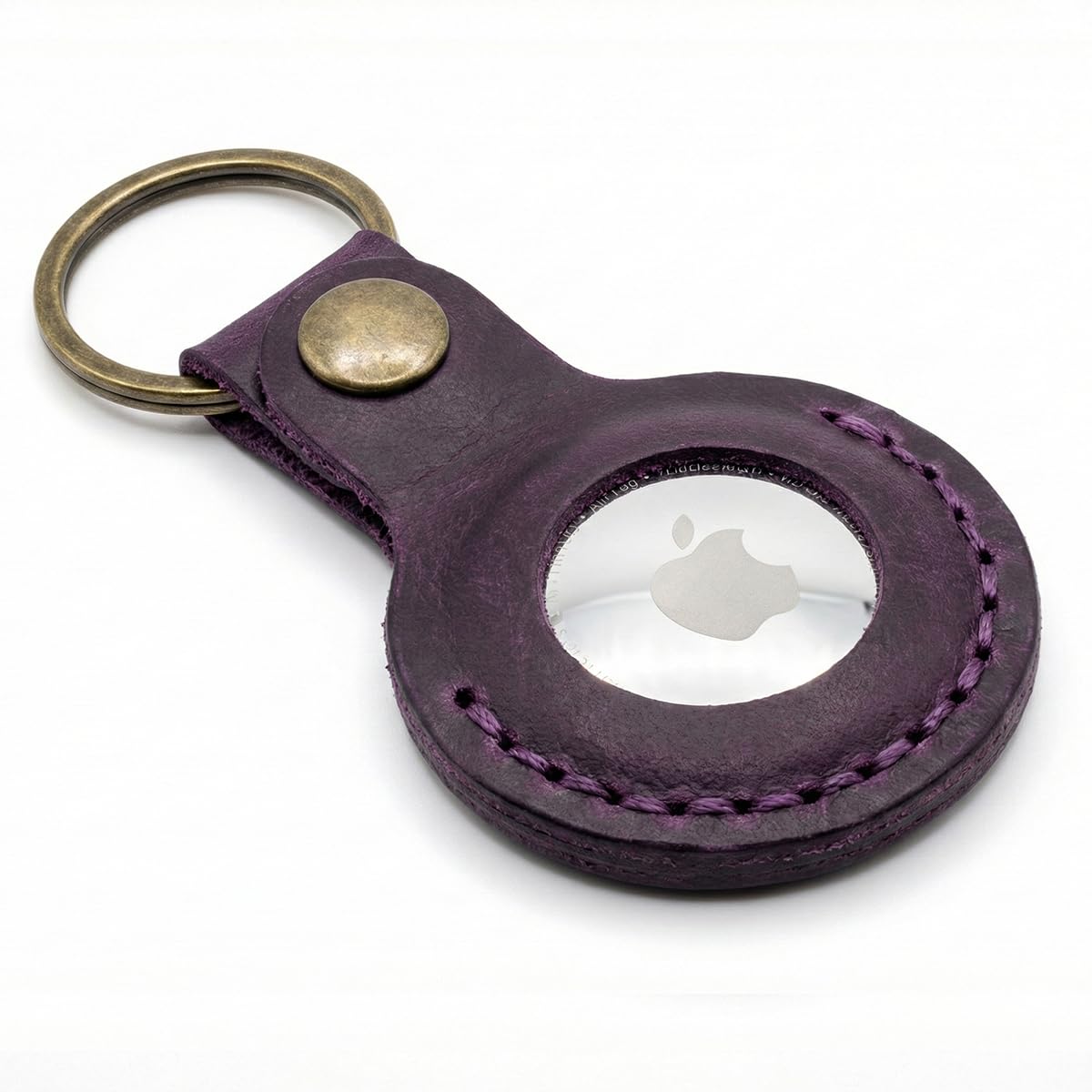
An Apple AirTag arrives as a bare disc with no hole, no loop and no clip. On its own it can sit loose in a bag, but it cannot hang from anything. An AirTag holder is the part that attaches it to the thing you actually want to find: your keys, a suitcase, a passport or a wallet. This guide covers where an AirTag is most useful, which kind of holder suits each place, and what to look for in a leather one. It is the starting point for everything we have written about AirTags.
What an AirTag holder does
A holder does three jobs. It gives the AirTag an attachment point, since the disc has none. It protects the polished steel back and the white face from scratches and knocks. And it keeps the tracker in one position, so it does not slide around a bag or wear a ring into the lining of a wallet.
What a holder should not do is get in the way of the tracker. The AirTag talks to nearby Apple devices over Bluetooth and uses ultra-wideband for Precision Finding. Leather does not block either signal. The one thing a holder can spoil is the speaker: cover the face completely and the Find My sound gets quieter, which is the moment you most need it loud. That is why the better leather holders leave the face open.
Where to put an AirTag
An AirTag is most useful on the things that are expensive or slow to replace, and that leave your sight regularly. In practice that means a short list.
On your keys
The most common choice, and usually the best. Keys go missing more often than anything else, they travel with you almost everywhere, and if your keys and wallet usually leave the house together, one tracker covers both. For keys you want a keychain holder: a leather case with a ring or clasp, sized to the disc so it adds as little bulk as possible to your pocket. Browse leather AirTag keychains.
In luggage
Checked bags are where AirTags earned their reputation. A tracker in your suitcase tells you whether the bag made the connection before you reach the carousel. Two placements work:
- Inside the bag, in a zipped inner pocket. Harder for anyone to find and remove, and the bag’s lining protects it. A keychain holder clipped to an inner loop or zip pull keeps it from rolling around.
- Outside the bag, on a handle or zip. Easier to reach, but visible. If you go this way, choose a holder with a closure that cannot be pulled open by a conveyor belt, which in practice means a metal snap rather than a magnet.
In the US, the FAA allows AirTags in both carry-on and checked bags; the coin cell inside is small enough to be permitted. Rules for other countries and airlines can differ, so check before an international flight. Recent versions of iOS also let you share an item’s location with a participating airline through a temporary link if a bag is delayed. For more on travelling with trackers and documents, see leather travel accessories.
With your passport
The strongest case for a tracker. A passport spends most of a trip in a bag you are not watching, and losing it abroad costs days, not money. Putting a loose AirTag between the pages is a poor idea: it presses a circular mark into the passport over a long trip. A passport holder with an AirTag slot solves that. Ours has a stitched pocket on the outside of the front cover with a round opening, so the speaker is uncovered and the disc never touches the pages. What to keep in a passport holder covers the rest of the setup.
In your wallet
Worth it if your wallet often leaves the house without your keys: a jacket you take off, a bag you set down, a front-pocket carry. The catch is thickness. An AirTag is about 32 mm across and 8 mm thick, and it will not slide into a card slot. We tested where it fits and how much bulk it adds in can you put an AirTag in your wallet, including whether an RFID-blocking lining gets in the way (mostly no).
On a bag, backpack or camera strap
A keychain holder with a spring clasp clips onto a backpack zip, a laptop bag ring or a camera strap as easily as a key ring. For a bag you put down in cafés and on trains, an AirTag attached inside the main compartment is less obvious than one dangling outside.
On a pet collar
Many people use a clip-on holder on a dog’s collar. Apple designs the AirTag to find items, not animals, and it only shows a location when an Apple device passes nearby, so it works better in a town than in open country. If you try it, choose a holder that closes securely and sits flat against the collar.
In a car or on a bike
For a car, the AirTag usually goes inside, hidden in the interior, and needs no holder at all. Bikes and scooters need a dedicated mount bolted to the frame, which is a different product from a leather holder. We do not make those.
Types of AirTag holder
- Keychain holder. A case with a ring or clasp. The most versatile: keys, bags, luggage zips and collars.
- Passport holder with an AirTag pocket. A passport cover with a built-in slot for the tracker.
- AirTag wallet. A wallet with a round compartment cut for the disc. Convenient, but it makes the wallet thicker at that point.
- Adhesive or screw mounts. For bikes, remotes and equipment. Plastic or metal, not leather.
- Silicone sleeves. Light and inexpensive, but held by friction. They stretch over time and can let the tracker slip out without you noticing.
What to look for in a leather AirTag holder
- A metal snap, not a magnetic flap. Magnets can release under a sideways drag, which is exactly what keys in a pocket or a bag on a conveyor experience. A snap closes with a click you can hear.
- A recess cut to the tracker. A case patterned to the disc holds it without relying on stretch.
- An open face. Keeps the Find My sound loud.
- A reinforced tab where the ring attaches. A single punched hole in one layer of leather slowly stretches into a slot and eventually tears.
- Full-grain leather and hand stitching. Full-grain is the dense outer layer of the hide; it wears in rather than wearing through.
We go into each of these, and the difference between waxed and plain leather, in what to look for in a leather AirTag holder.
Our leather AirTag holders
Crazy Horse leather, snap closure
Waxed full-grain hide that hides scratches as the wax moves back across the surface. Each holder closes with a metal snap and leaves the face open. In classic black and hunter green they hang from a stainless steel ring with a quick-release clasp; the damson purple version has a solid brass snap and ring, which will not rust on a bag that gets rained on. The same Amazon listing also offers pomegranate red, slate grey, deep indigo and cognac.
Plain full-grain cowhide
An unwaxed hide that records every mark and darkens where you handle it, so it ages in the opposite direction to Crazy Horse. Made in Jordan Brown, Eden Green and Pentecost Red, each debossed with a short Scripture line on the front. There is also a hand-stitched full-grain keychain holder without lettering.
For a household
The AirTag keychain 4-pack gives four holders in four colours, so each set of keys or each family member’s bag is easy to tell apart at a glance.
For travel
The leather passport holder with AirTag slot, in brown Crazy Horse leather, with card slots and a pocket for cash or a boarding pass inside.
Living with an AirTag
Battery
An AirTag runs on a CR2032 coin cell, which Apple rates at about a year of normal use. Your iPhone tells you when it is low. To change it, press the steel back and twist. Choose a holder you can open easily; one that has to be cut or forced open will not survive the first battery change.
Sharing with family
Since iOS 17 you can share an AirTag with up to five other people in Find My. Do this for shared car keys or a family suitcase. It also stops the people you share with from receiving unknown-tracker alerts for an AirTag that is legitimately travelling with them.
Unknown-tracker alerts
iPhones, and Android phones in recent versions, warn people when an unknown tracker seems to be moving with them. This is aimed at trackers separated from their owner, and it is a good thing. It does mean that if a family member borrows your car keys for a few days, they may see an alert unless the AirTag is shared with them.
Lost Mode
If something goes missing, put the AirTag in Lost Mode and add a phone number. Anyone who finds it can tap it with an NFC-capable phone to see your message. A holder with an open face makes that easier.
AirTag holders as gifts
A leather AirTag keychain is one of the most useful small gifts you can give, and it fits a stocking. If the person already owns an AirTag, the holder alone is enough; if not, put the two together. See stocking stuffers for men and stocking stuffers for dad for more ideas in the same spirit.
Short answer
- Keys, bags and luggage zips: a leather AirTag keychain with a snap closure.
- Passport: a passport holder with an AirTag slot.
- Wallet: possible, with trade-offs; read can you put an AirTag in your wallet.
- Several sets of keys: the 4-pack.
- Comparing holders: what to look for in a leather AirTag holder.
Common questions
Does an AirTag come with a holder?
No. An AirTag comes on its own, with no hole or loop, so it cannot be attached to keys or a bag without a holder. You can carry it loose in a bag, but a holder protects it and keeps it in place.
What is an AirTag holder used for?
To attach an AirTag to something you want to track, such as keys, a suitcase, a backpack or a pet collar, and to protect the tracker from scratches and knocks. Passport holders and some wallets have a built-in AirTag pocket for the same reason.
Where is the best place to put an AirTag in luggage?
Inside the bag, in a zipped inner pocket or clipped to an inner loop. It is harder to find and remove there, and the bag protects it. If you attach it outside, use a holder with a metal snap that cannot be pulled open on a conveyor.
Does a leather case block the AirTag signal?
No. Bluetooth and ultra-wideband pass through leather without a meaningful loss of range. A case that covers the whole face can make the Find My sound quieter, which is why open-face holders are the better choice.